The central nervous system coordinating plugin lifecycles, dependency resolution, and concurrent application events.
The Challenge
FastAPI provides a powerful lifespan hook, but as the number of modules grows, managing initialization order becomes a liability. Developers often resort to:
1. Fragile Sequencing: Manually ordering database connections, cache priming, and background workers in a single function. A single misplaced line causes runtime failures.
2. Coupled Event Handling: Directly calling functions across modules (e.g., UserService calling EmailService), which creates tight coupling and makes the system harder to test or modify.
3. Startup Bottlenecks: Executing every initialization task sequentially, unnecessarily increasing the time it takes for the application to reach a "Healthy" state.
The ZCore Elegance
The Kernel manages the application lifecycle through Topological Orchestration. It builds a dependency graph of your plugins and ensures each one starts and stops in the mathematically correct order. Complementing this, the EventDispatcher provides a loosely coupled communication bus where handlers execute concurrently without blocking the main event loop.
# 1. Orchestration
kernel = Kernel()
kernel.add_plugin(AuthPlugin())
kernel.add_plugin(DatabasePlugin()) # Sorted automatically

# 2. Decoupled Communication
@kernel.dispatcher.subscribe("user_registered")
async def send_welcome_email(payload):
    # Executes concurrently with other listeners
    await email_provider.send(...)

# 3. Clean Integration
app = FastAPI(lifespan=kernel.lifespan)
kernel.setup(app)
# Manual, fragile ordering in a single function
@asynccontextmanager
async def lifespan(app: FastAPI):
    # 1. Manual Startup Order (Risk of failure if out of sync)
    await init_db()
    await init_auth()

    # 2. Tight Coupling (Email must be called directly)
    # No built-in way to dispatch events concurrently easily
    try:
        yield
    finally:
        # 3. Manual Shutdown Order
        await close_auth()
        await close_db()

app = FastAPI(lifespan=lifespan)
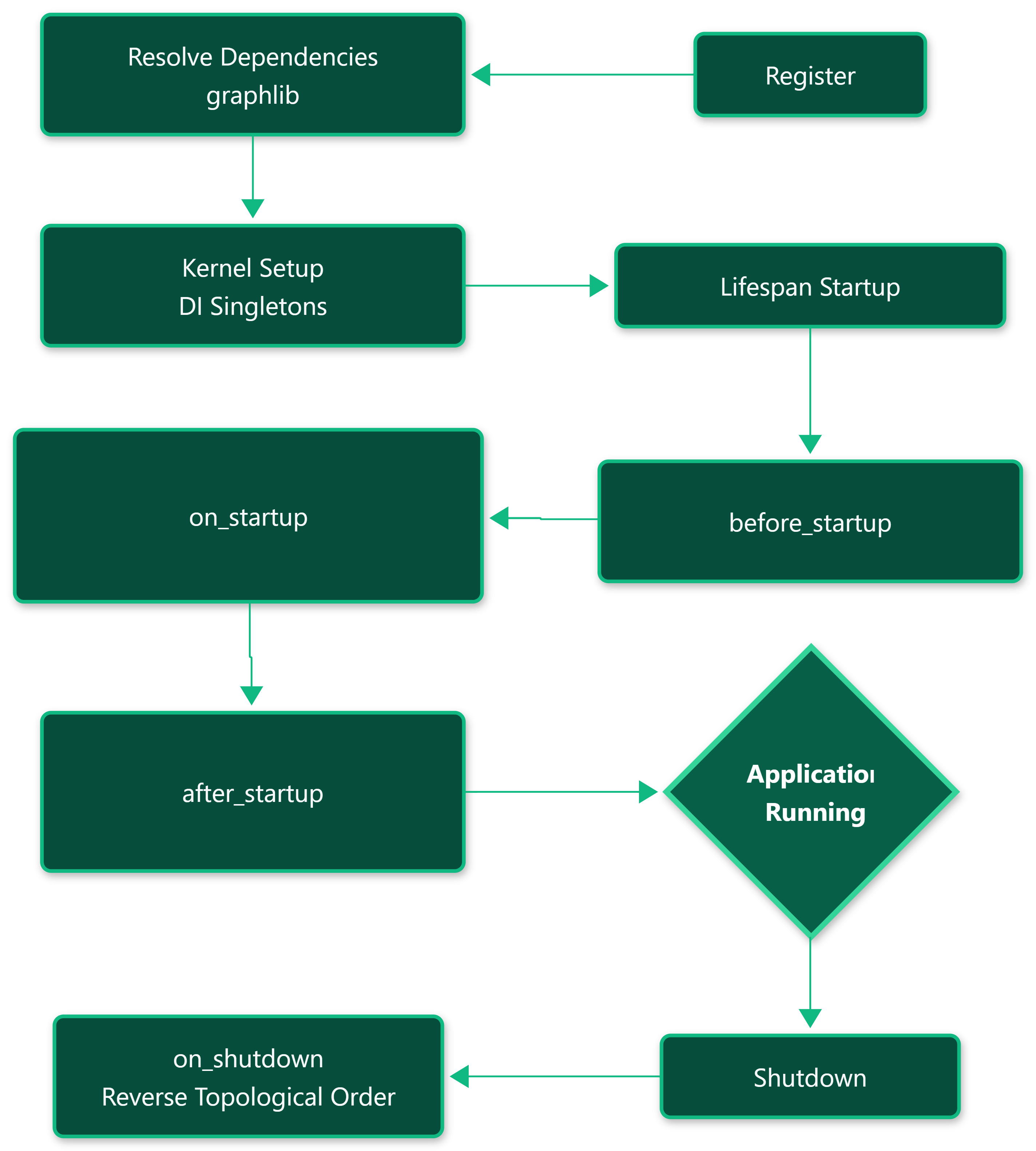
Orchestration Workflow
The Kernel transforms your declarative plugin list into an executed lifecycle through a rigorous sorting and execution pipeline.
Boundaries & Integration
The Kernel and Dispatcher are designed to wrap around FastAPI's native async capabilities without obscuring them.
- Lifespan Injection: The
kernel.lifespanmethod is a standard Python asynchronous context manager. It is passed directly to theFastAPIconstructor, meaning the native Starlette lifecycle is what actually drives ZCore. - Decoupled Events: The
EventDispatcheris registered as a singleton in thecontainer. You can inject it into anyBaseServiceorBaseRepositoryusingInject(EventDispatcher)to trigger events from deep within your domain logic. - Bypass: If you don't want to use the Plugin system, you can still use the
EventDispatcheras a standalone library within your project to handle internal signaling.
Under-the-Hood Spec
1. Reverse-Topological Shutdown
While startup follows a dependency path (A -> B), the Kernel ensures that shutdown occurs in reverse order (B -> A) [kernel/engine.py]. This ensures that shared resources, like database pools, are only closed after the domain modules using them have safely terminated.
2. Concurrent Event Execution
The EventDispatcher.dispatch method schedules all registered async handlers using asyncio.gather [kernel/events.py]. Crucially, it sets return_exceptions=True and logs errors within the dispatcher. This prevents a failure in a single listener (e.g., a failing email server) from crashing the entire request or the application.
3. Missing Dependency Assertion
During the _resolve_dependencies phase, the Kernel performs a cross-reference check [kernel/engine.py]. If a plugin declares a dependency string that does not exist in the active registry, the Kernel raises a descriptive RuntimeError, preventing the application from starting in an incomplete state.
Event Handlers
The Dispatcher supports both standard synchronous functions and asyncio coroutines. Synchronous handlers are executed sequentially, while asynchronous ones are gathered for concurrent execution.